Today’s Special

All-in-One Beauty Retouch bundle - master beauty retouching at a professional level.

Save $282→
Today’s Special

Beauty Retouch & MUA Retouch together at your service

Save $50+→
Today’s Special

All-in-One Beauty Retouch bundle - master beauty retouching at a professional level.

Save $282→
Today’s Special

Beauty, Skin & Hair Retouching for Beginners in a bundle

Save $181→
Skip to content
Testimonials
Newsletter
Contact Us
Customer Login
Retouching Academy
Home
Learn ▼
Your Course Library
Code of Professional Practice
Shop ▼
Retouching Courses & Bundles
Retouching Panels
Practice Files: Beauty
Blog
Home
Learn
Your Course Library
Code of Professional Practice
Shop
Retouching Courses & Bundles
Retouching Panels
Practice Files: Beauty
Blog
Testimonials
Newsletter
Contact Us
Sign In
RA Courses → Student Login
RA Panels → User Login
RA Affiliate Login
RA Courses → Student Login
RA Panels → User Login
RA Affiliate Login

Sign in

close


Lost your password?
No account yet? Create an Account
  • Home
  • Store
    • Courses & Bundles
    • Retouching Panels
    • Practice Files
  • Newsletter
  • Contact Us
  • Blog
  • Customer Login
    • Affiliate Login

Shopping cart

close
  • Instagram
  • YouTube
THE COMMERCIAL SIDE OF PHOTOGRAPHY & RETOUCHING
  • Testimonials
    • Submit Yours
  • Customer Login
    • Affiliate Login
  • Newsletter
  • Contact Us
  • Home
  • LEARN
    • YOUR COURSE LIBRARY
    • Code of Professional Practice
  • Shop
    • Retouching Courses & Bundles
    • Retouching Panels
    • Practice Files – Beauty
  • Blog
Retouching Academy Retouching Academy
close
Cart (o) 0 / $0.00 USD
Read More
27 Oct
Fundamentals, Software for Retouching, Video Tutorial

The difference between Brush Opacity & Fill and Layer Opacity & Flow

  • January 19, 2019
  • Posted by Michael Woloszynowicz
  • fundamentals, opacity, retouching tools
  • 2 comments
BRUSH OPACITY vs. FLOW While most people starting out with Photoshop tend to utilize Opacity slider and leave Flow untouched, knowing the difference between the two will allow you to...

Read more

  • Facebook
  • Twitter
  • Email
Read More
20 Oct
Fundamentals, Software for Retouching, Video Tutorial

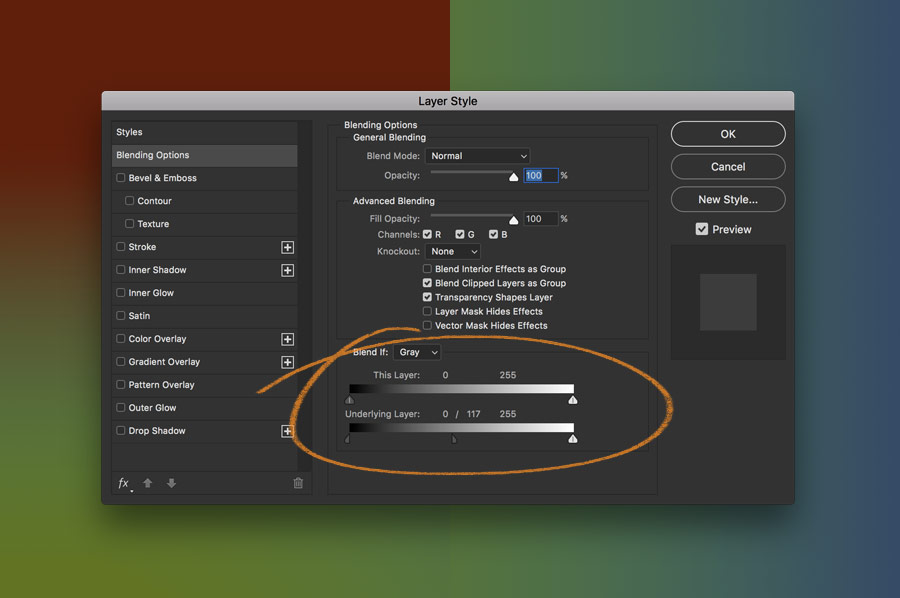
Working with Layer Blend If Sliders in Adobe Photoshop

  • November 3, 2018
  • Posted by Michael Woloszynowicz
  • adobe photoshop, blend-if, selections
  • 1 comment
Learn how to work with this super useful and often overlooked function of Layers Blending Options - Blend If Sliders. In this video I will show you how the Blend...

Read more

  • Facebook
  • Twitter
  • Email
Read More
18 Oct
Fundamentals, Software for Retouching, Video Tutorial

How to Work Smart With Quick Mask in Adobe Photoshop

  • November 3, 2018
  • Posted by Michael Woloszynowicz
  • quick mask, selections
  • 2 comments
Quick mask is a Photoshop tool that can be used in a wide range of image editing situations. It will be quite handy for a retoucher working with Architectural...

Read more

  • Facebook
  • Twitter
  • Email
Read More
11 Oct
High-End Beauty & Fashion

A Glimpse Into Practical Color Correction

  • October 29, 2018
  • Posted by Julia McKim
  • color correction, working with colors
  • Leave a comment
Since I am a very intuitive photographer and retoucher, I might not always use the easiest way to achieve a certain result. For me the key to color correcting...

Read more

  • Facebook
  • Twitter
  • Email
Read More
11 Sep
Fundamentals, Software for Retouching

How to Set Preferences & Memory Usage for Peak Performance – Photoshop CC, CS6

  • January 19, 2019
  • Posted by Julia Kuzmenko McKim, RA Team
  • memory, performance, photoshop
  • 9 comments
Here are a few ways to enhance Photoshop performance: Optimize your current hardware Customize Performance Preferences in Photoshop Tailor your Photoshop work habits (read more: History, Caches & Performance-Friendly Work...

Read more

  • Facebook
  • Twitter
  • Email
Read More
27 Aug
Fundamentals

Light & Shadow Basics

  • July 23, 2020
  • Posted by Julia Kuzmenko McKim, RA Team
  • basics, light & shadows, lighting
  • Leave a comment
It is important to understand the basics of the studio and ambient lighting for retouchers just as it is for painters, photographers and any visual artists for that matter....

Read more

  • Facebook
  • Twitter
  • Email
Read More
23 Aug
Fundamentals, Software for Retouching

Working With The Healing Brush Tool

  • September 4, 2020
  • Posted by Lulie Talmor
  • basics, beauty retouching, Healing Brush
  • 3 comments
As a Beauty & Fashion retoucher, one of the tools I most often go to is the Healing Brush tool. It works similarly to the Clone Stamp tool in...

Read more

  • Facebook
  • Twitter
  • Email
Read More
23 Aug
Fundamentals

Camera Settings For Better Images

  • August 24, 2021
  • Posted by Julia Kuzmenko McKim, RA Team
  • basics, camera settings, iso
  • 4 comments
Beginner photographers will often jump to studying retouching before they have their photography and lighting skills fine-tuned. However, it is smarter to start with a solid photographic foundation before refining...

Read more

  • Facebook
  • Twitter
  • Email
Read More
05 Aug
Fundamentals

What is ISO?

  • November 3, 2018
  • Posted by Julia Kuzmenko McKim, RA Team
  • image noise, iso, Qualities of Digital Images
  • 1 comment
WHAT IS ISO? ISO stands for International Organization for Standardization, and in terms of photography, designates an exposure index system devised by that organization. In essence, ISO is an exposure...

Read more

  • Facebook
  • Twitter
  • Email
Read More
31 Jul
Fundamentals

Understanding Image Noise

  • November 3, 2018
  • Posted by Julia Kuzmenko McKim, RA Team
  • image noise, iso, Qualities of Digital Images
  • 6 comments
What is Image Noise In digital photography, image noise can be compared to film grain for analogue cameras. Image noise usually manifests itself as random speckles on a smooth surface...

Read more

  • Facebook
  • Twitter
  • Email
Read More
24 Jul
Fundamentals

Dynamic Range in Digital Photography

  • October 16, 2018
  • Posted by Julia Kuzmenko McKim, RA Team
  • dynamic range, fundamentals, Qualities of Digital Images
  • 12 comments
In photography, dynamic range is the ratio between the least and the highest measurable intensity of light. Simply put, it is the range of light and tonal detail from...

Read more

  • Facebook
  • Twitter
  • Email
Read More
23 Jun
Fundamentals

Sharpness Vs. Focus in Digital Photography

  • January 19, 2019
  • Posted by Julia Kuzmenko McKim, RA Team
  • focus, Qualities of Digital Images, sharpness
  • 2 comments
Sharpness: Acutance + Resolution Sharpness is the level of the clarity of detail in a photo and is a valuable tool for emphasizing textures of subjects and subjects' details in an image....

Read more

  • Facebook
  • Twitter
  • Email
Read More
18 Jun
Fundamentals, Working With Colors

Bit Depth: 8-bit Vs. 16-bit

  • February 5, 2018
  • Posted by Julia McKim
  • Bit Depth, fundamentals, working with color
  • 18 comments
Bit Depth is a metric of how many unique colors are in the color palette of an image that are used to represent each of the colors. This is...

Read more

  • Facebook
  • Twitter
  • Email
Read More
15 Jun
Fundamentals, Software for Retouching

Image File Formats, Resolution & Size

  • August 22, 2024
  • Posted by Julia Kuzmenko McKim, RA Team
  • file formats, fundamentals
  • 7 comments
Image File Formats One of the main criteria that distinguish different file formats is image compression. Compressed files' size is significantly smaller and allows us to send or upload them...

Read more

  • Facebook
  • Twitter
  • Email
«‹161718
Close
Retouching Academy
★★★★★ 4.9 / 5 52,000+ students & panel users worldwide

For photographers and retouchers interested in commercial work and getting hired by beauty, wellness and lifestyle brands. We teach retouching and visual production standards that commercial clients expect today.

// RA Newsletter

The Industry Is Moving. We Track What’s Changing, So You Don’t Have To.

Practical resources for working photographers and retouchers:

  • Commercial Work & Clients: how brands and businesses hire creative professionals today, and how to get hired.
  • Retouching Skills: post-production workflow, retouching tools and techniques, and visual standards that commercial clients expect today.
  • Industry & AI News: the tools and shifts worth your attention. Put AI to work on your day-to-day chores, so you can do more of what you love.

Free, straight to your inbox:

No spam. Unsubscribe any time.

// New · Beauty Retouch v5

The Legendary Beauty Retouch Panel, Now AI-Augmented

Beauty Retouch is a Photoshop plugin for photographers and retouchers who want a faster retouching workflow, more consistent skin and tonal work, and a decluttered workspace.

Learn more →

Categories

Commercial Work & Clients→ Retouching Skills & Tools→ Industry & AI News→

Recent Posts

  • How to Avoid Excessive Revisions in RetouchingDec 4, 2025
  • Important Update: Legacy RA Panels and the New UXP UpgradeOct 24, 2025
  • Skin Work & Frequency Separation Section on the latest Beauty Retouch PanelOct 3, 2025
  • AI in Vogue: The PushbackSep 8, 2025

Our Products

  • All-in-One Beauty Retouch $287$569 Beginner to Advanced · 21+ hours · Lifetime · Practice files · Custom Actions & Brushes
  • Professional Skin Retouching $169 Intermediate to Advanced · 7+ hours · Lifetime · Practice files · Custom Actions & Brushes
  • Beauty Retouch v5 Panel $89 Photoshop plugin for photographers and retouchers who want a faster retouching workflow, improved consistency of skin and tonal work, and a decluttered workspace.
  • Beauty Retouching for Beginners $127 Beginner · 4+ hours · Lifetime · Practice files · Custom Actions & Brushes
©2026 QUEENSCLIFF GLOBAL LLC. ALL RIGHTS RESERVED.
  • Facebook
  • Twitter
  • Email
Retouching Academy
★★★★★ 4.9 / 5
52,000+ students worldwide

For photographers and retouchers interested in commercial work and getting hired by beauty, wellness and lifestyle brands. We teach retouching and visual production standards that commercial clients expect today.

retouchingacademy.com
// RA Retouching Panels:
retouchingacademylab.com
// quick links
Retouching Courses
Retouching Panels
Newsletter
Testimonials
Blog
Customer login
Affiliate Program
Contact Us
// our best-sellers
Beauty Retouch v5 PanelPhotoshop plugin for photographers and retouchers who want a faster retouching workflow, improved consistency of skin and tonal work, and a decluttered workspace.$89
All-in-One Beauty Retouch bundleBeginner to Advanced · Over 21 hours · Lifetime Access · Practice beauty files · Custom Actions & Brushes$569$287
Professional Skin RetouchingIntermediate to Advanced · Over 7 hours · Lifetime Access · Practice beauty files · Custom Actions & Brushes$169
Beauty Retouching for BeginnersNovice · Over 4 hours · Lifetime Access · Practice beauty files · Custom Actions & Brushes$127
// the ra newsletter
Written for photographers and retouchers interested in commercial work. Read by 24,700+ creative professionals worldwide.
    // no spam · unsubscribe anytime
    © 2026 Queenscliff Global LLC · All rights reserved
    Terms & Conditions
    ·
    Privacy Policy
    Scroll To Top Sidebar
    We use cookies to improve your experience on our website. By browsing this website, you agree to our use of cookies.
    Accept More info