

// 01 · Photoshop UXP plugin · Modernized · AI-augmented
Professional Beauty Retouching. Old-School Precision.
The Beauty Retouch panel is a Photoshop plugin for photographers and retouchers who want a faster professional retouching workflow, a convenient interface, improved consistency of skin and tonal work, and a decluttered workspace.
Apple Silicon) & WinRequires PS v27.9+ for all features to work
// Why a Photoshop panel
Your Professional Eye Stays in Charge.
One-click apps and AI platforms are fast, but they decide for you and don’t offer a detailed revision route when your clients request changes. Manual setup gives you full control but costs hours of your precious time on every image. Beauty Retouch panel takes on the boring, tedious tasks and leaves creative retouching decisions to you.
AI & one-click apps
- Fast and furious
- Little control over results, no precision control
- Don’t hold up for client work
- Client files leave Photoshop for a separate platform
- Output files capped below a working campaign file size
Manual retouching
- Full control, high precision
- Slow turnaround, outdated approach to client work in 2027
- Hours wasted in the long run digging through PS menus and setting up the same layers for every image
- Settings and results drift across files and sets, especially under deadline
Beauty Retouch panel
- Fast setups, full control of the results
- Consistent settings for key tools and techniques
- Fast turnaround for client work that demands high-quality results
- Decluttered workspace, all tools you need in one place
- Enjoy your creative time while the panel takes care of the tedious tasks
// 02 · New UI, tools, and features
What’s New in Beauty Retouch 6.0
New look, Light/Dark UI toggle, new tools, auto-selections, built-in RA Beauty Brushes, and a Live Help Screen. Same panel, modernized and ready for 2027.
See the full list of improvements and additions below.
Built-in Custom Beauty brushes
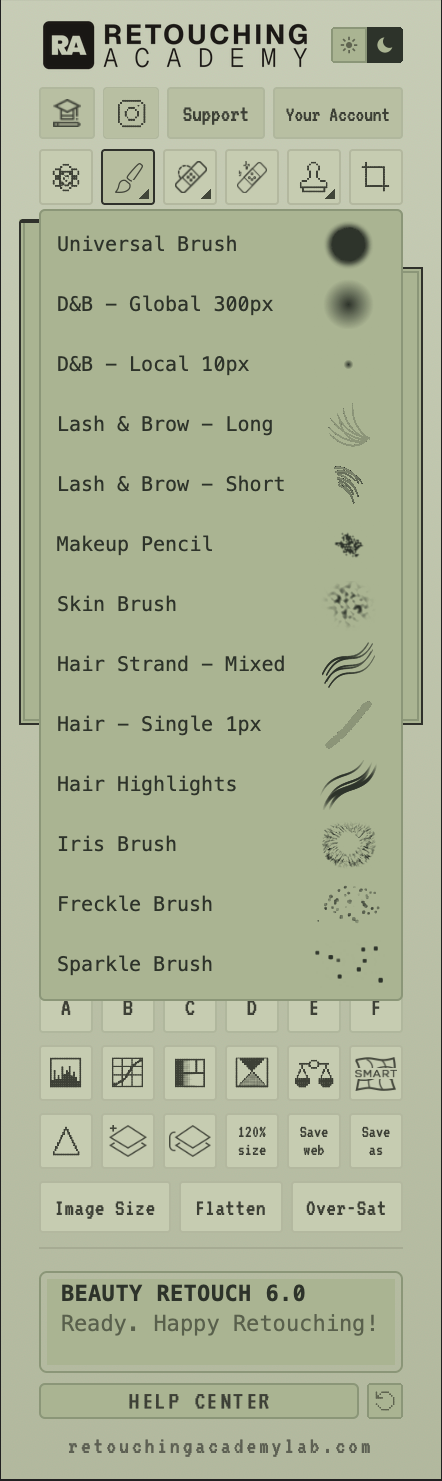
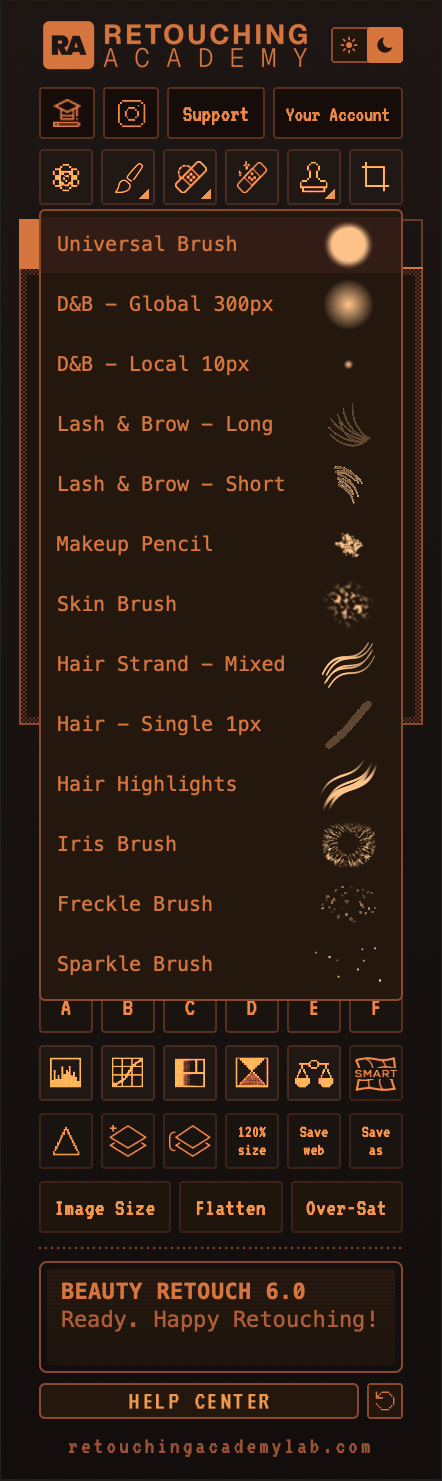
We’ve built in our custom brushes that everyone in beauty, portrait, and fashion retouching must have. Select various types of brushes in the dropdown above to see their shapes and behavior.
Note that the brushes are demonstrated at 100% Opacity and Flow for visibility; the actual brushes may have other settings.
Developed by Julia Kuzmenko McKim.
Live Help Screen
When a script can’t run, the screen at the bottom of the panel shows the error code and a link to its troubleshooting page.
It also works like a pager, so we can send you a notification when a new panel update is available in your account.
Click the features on the left to see their previews:
Select People Feature
The panel can automatically select Eyes, Lips, Teeth, Face & Upper Body, and Hair for everyone in the frame.
We’ve also built these auto-selections into the Teeth, Eyes, Skin Tone, Glow, Anti-Pink, and Hair Highlights scripts to save you even more time on setting things up.
IMPORTANT! These great workflow accelerators require Photoshop® 2026 (v27.9) or later to work.
Dark/Light UI toggle
You don’t have to choose the panel’s user interface (UI) before buying it anymore. Click the toggle in the upper-right corner to switch between the Sage (light) and Amber (dark) interface options.
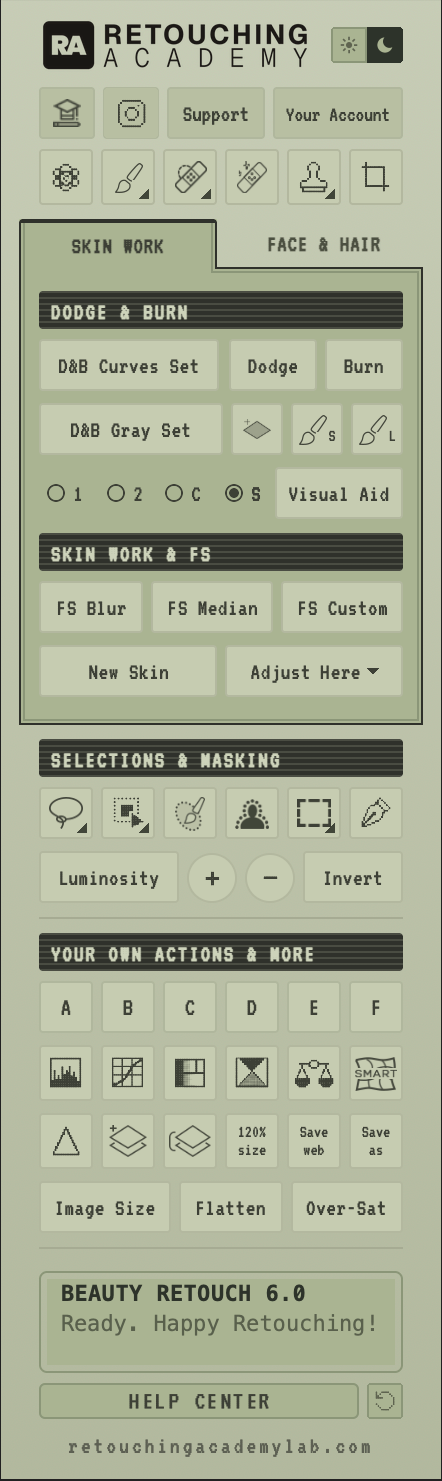
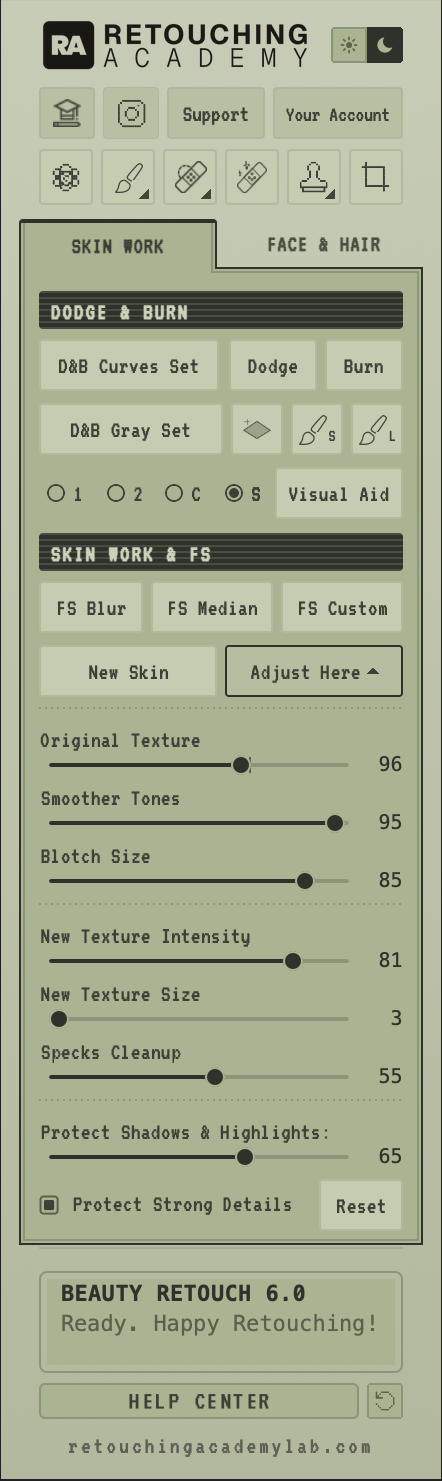
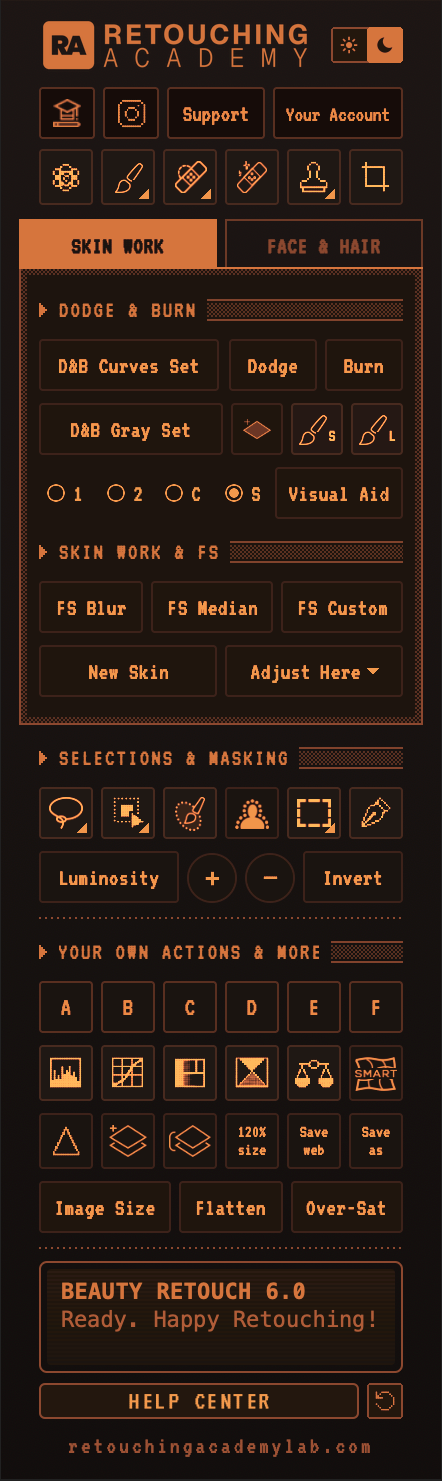
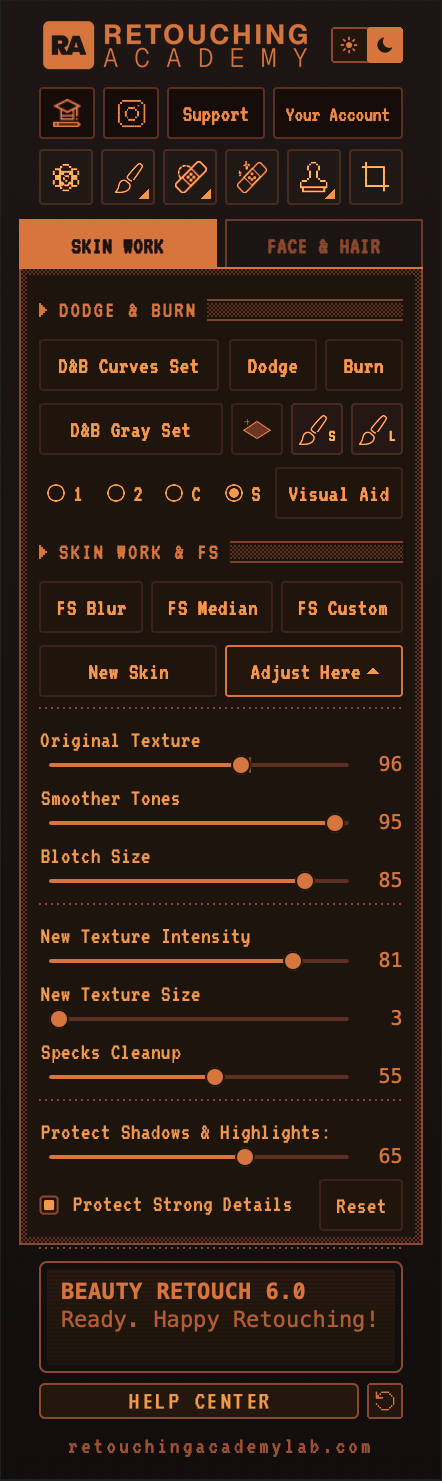
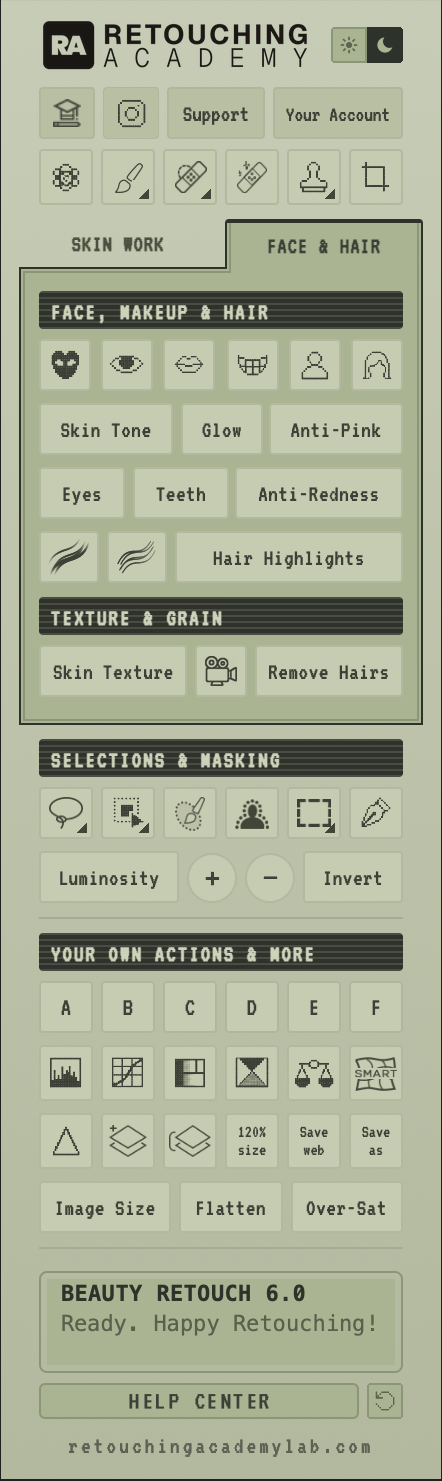
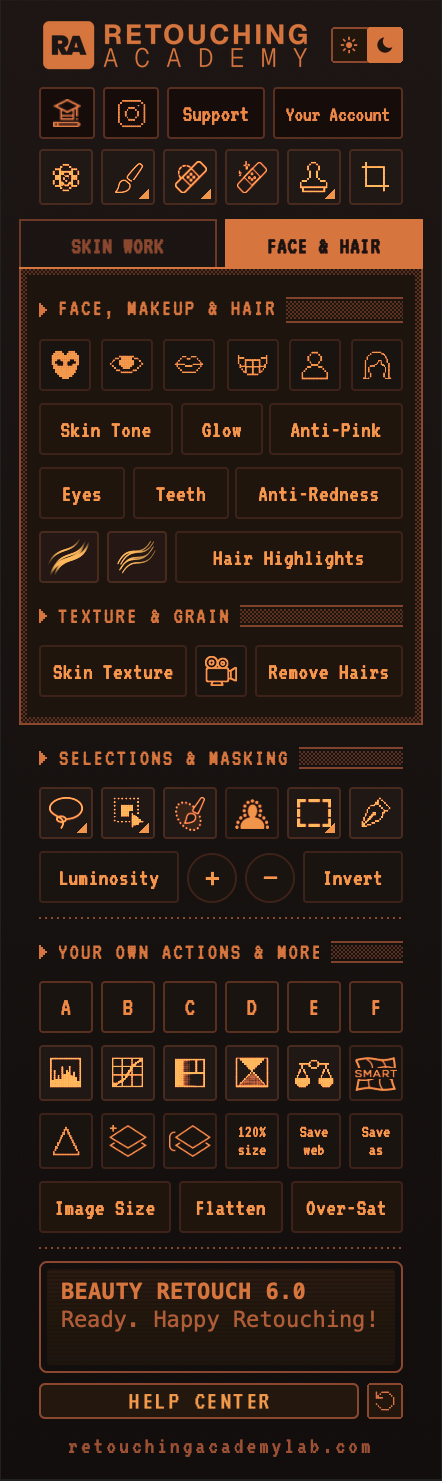
The automatic masks and auto-selections buttons need Photoshop® 2026 (v27.9) or later.
New buttons & tools added
Beauty Retouch 6.0 features many new tools and rebuilt scripts. To keep the panel compact, we’ve put them on two tabs: Skin Work holds Dodge & Burn and Skin Work & FS, and Face & Hair holds Face, Makeup & Hair buttons, as well as the Skin Texture, Film Grain, and Remove Hairs buttons.
- RA Beauty Brushes built in: we’ve added new beauty brushes such as the Universal, Lash & Brow, Makeup Pencil, Skin, Iris, Freckle, and Sparkle brushes, alongside the custom D&B and Hair brushes from earlier versions.
Hold the Brush button in the tools row at the top of the panel, or click the small triangle in its corner, and pick the brush you want from the dropdown.
This is one of the additions our team is most excited about: we all retouch daily and find it very helpful. - Selection buttons: select Eyes, Lips, Teeth, Face and Upper Body, and Hair. These buttons select the named parts for everyone in the frame.
- New Skin: fully rebuilt, so it’s easier for anyone to use. Run New Skin, paint white on the group’s black mask over the skin you want to improve, then press Adjust Here to open the sliders and match the tone smoothing, blotch size, texture and specks cleanup to the image at hand.
- Multiple Instrument choices: hold the Brush, Spot Healing Brush, Clone Stamp, Lasso, Object Selection, or Marquee tool button, or click the small triangle in its corner, to pick a related tool, as you would from Photoshop’s toolbar. Spot Healing button holds the Spot Healing Brush and the Healing Brush, Clone Stamp offers four tips (Hard Round 72%, Soft Round 100%, Skin Brush, and Makeup Pencil), Lasso adds Polygonal and Magnetic Lasso, Object Selection adds Quick Selection and Magic Wand, and Marquee adds Elliptical Marquee.
- Auto Skin Mask: this script creates a group masking the skin on the face, with the eyes and mouth excluded. Adjust the mask to your image and use this layer group for color corrections or anything you want to be constrained to the face only.
- Film Grain: adds an editable Grain adjustment layer over the whole frame. This is a different type of texture and should not be used in place of the synthetic Skin Texture script.
Live Help Screen & Dark/Light UI toggle
- Dark/Light UI options: now you can switch from Sage (light) to Amber (dark) with a toggle in the upper-right corner.
- Live Help Screen: when a script can’t run, the screen on the panel shows what happened, with an RA error code and a link to its troubleshooting page.
- Live updates on the Screen: it works like a pager. When a new version of the panel is ready in your Member Account, or we have news for you, such as a new video tutorial, the Screen shows it when you open the panel, with a button that takes you there. Close it with the ✕ so you can see the script status messages while you work.
Better behavior
- Skin Texture is fully editable: its filters are Smart Filters, so double-click one in the Layers panel to change the grain amount, size, or relief for the image at hand.
- Visual Aid: pick the version you need with the small round buttons next to it, then press Visual Aid to set it up. (1): black & white for D&B. (2): the same, with more contrast. (C): Color Check. (S): Solar Curve, to check a studio background for sensor spots and retouching footprints. Your pick stays set; change it when you need a different Visual Aid.
- Tooltips: each button now has a tooltip pop-up so you can see what the script or tool does.
- Pop-ups have a “Don’t show again” box. To bring hidden pop-ups back, click the backward arrow button next to HELP CENTER, under the Screen. It appears once you’ve turned a pop-up off.
- Levels and Curves: a click on either of those buttons adds an adjustment layer, as before. Option-click (Alt-click on Windows) applies Levels or Curves directly to the active layer or layer mask, with the dialog open. If you build luminosity masks for color grading, you can tighten a mask right from the panel.
Built-in Masks in Scripts
Teeth (formerly Magic Smile), Eyes (formerly Magic Eyes), Skin Tone, Glow, Anti-Pink, and Hair Highlights now come with masks for their respective parts of the face or hair. Click, fine-tune the mask, and adjust the settings to your image when needed:
- Eyes: the eye whites layer is masked to the whites, and the eye color layer to the irises.
- Teeth: masked to the teeth.
- Skin Tone, Glow and Anti-Pink: masked to the skin of the face, upper body, and hands, with the eyes, lips, and teeth left out.
- Hair Highlights: masked to the hair.
- Sharpen: an active selection becomes the Sharpen layer’s mask.
- Your own selection first: make a selection before you click, and Teeth, Skin Tone, Glow, Anti-Pink and Hair Highlights use it as their mask instead.
- Photoshop version: Beauty Retouch 6.0 installs on Adobe® Photoshop® 2025 (v26.0) or later. All 6.0 tools and scripts, including the automatic masks and the Select People buttons, work on Photoshop® 2026 (v27.9) or later. On earlier versions, the masked scripts build as they did in v5 and the Select People buttons don’t run. For the best experience, update Photoshop to the latest version.
Where things moved (for v5 users)
- Skin Texture (formerly Add Texture), Film Grain and Remove Hairs buttons are now at the bottom of the Face & Hair tab, in the TEXTURE & GRAIN section.
- Image Size, Flatten Image and Over-Saturation are now at the bottom of YOUR OWN ACTIONS & MORE section.
- Solar Curve: Solar Curve is now the S option in the Visual Aid row on the Skin Work tab.
- D&B Brush S (small) and Brush L (large) are also in the Brush button’s menu in the tools row, listed as D&B - Local 10px and D&B - Global 300px.
// 03 · Tools · 50+ scripts & instruments
Everything a Retoucher
Needs. In One Place.
Built by and for working photographers and retouchers. Your taste and judgment control the outcome. AI-augmented tools and scripts help you get to the finish line faster.
// 01 · Top & bottom of panel
Tools & Custom Brushes
A wide range of native Photoshop retouching and selection tools, adjustment layers, and handy routine functions for beauty retouching, all in one place. RA Custom Beauty Brushes for skin and makeup work are baked into the latest version.
// 02 · Skin work, D&B, FS
Skin Texture & Tone
Multiple setups for Dodge & Burn with custom D&B brushes, Frequency Separation (via Median, Gaussian Blur, and Custom), Visual Aids for D&B and color work. The New Skin script is fully rebuilt, with sliders to fine-tune the result.
// 03 · Selections & masking
Masking Precision Work
A range of Photoshop native Selection tools used in beauty retouching. Our very own Luminosity Masking set, the color grading “secret weapon” for our power users. Option-click (Alt-click on Windows) Levels or Curves to tighten a luminosity mask right from the panel.
// 04 · Face, makeup & hair
Crucial Beauty Detail
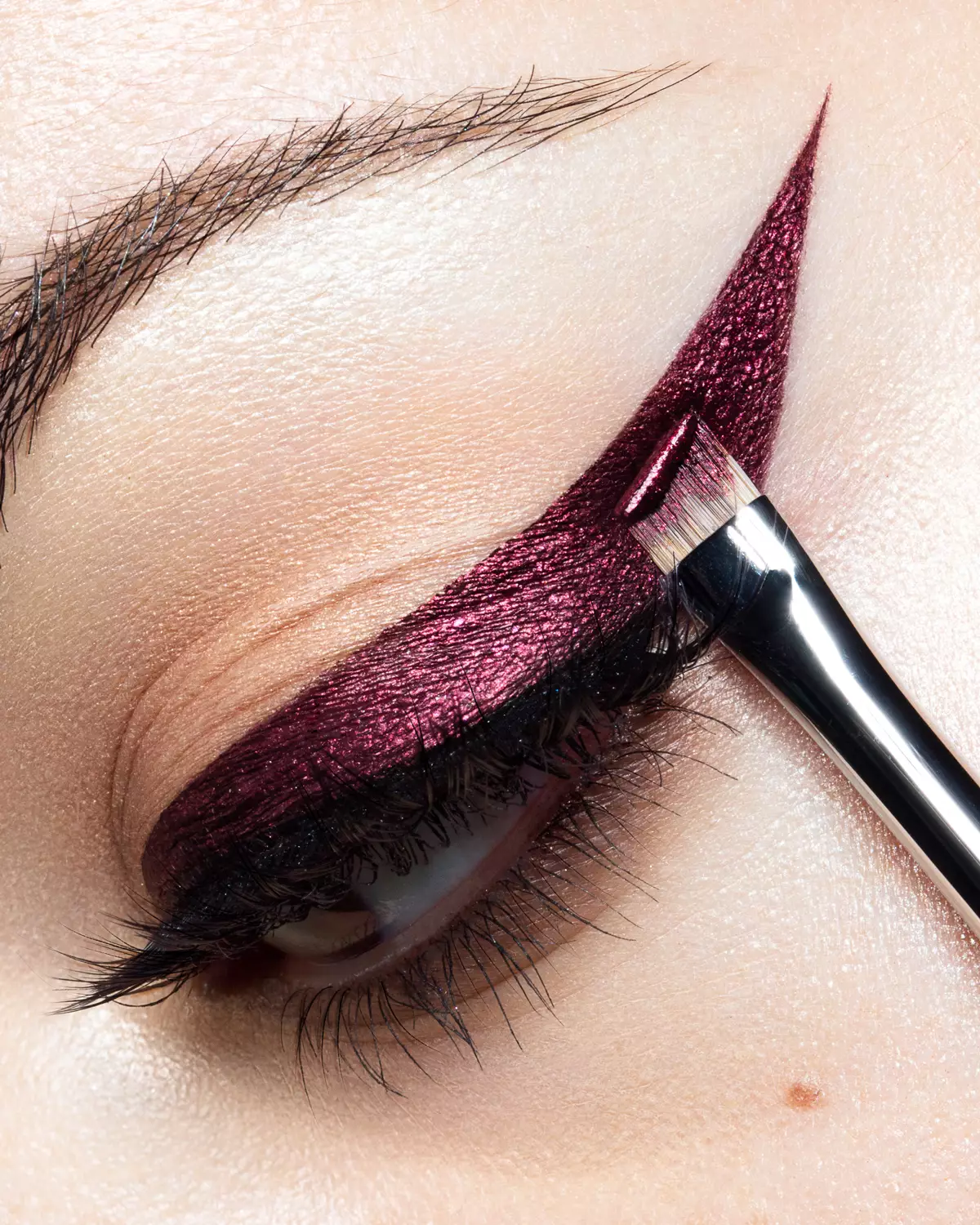
The nuanced work that needs your eye. Skin Tone, Glow, Anti-Pink, Eyes, Teeth, and Hair Highlights arrive masked, ready for you to tune them up. Use our custom Beauty Brushes for skin, lashes, makeup, freckles, hair, and more.
// 05 · AI-augmented features
AI That Works For You
Fix small or complex production issues, fast. Add or remove elements (props, accessories, wardrobe, manicure, etc.). Your professional judgment stays in charge, AI-augmented features take you to the finish line faster.
// 06 · Finish & export
Quality Control & Output
Quality control through final visual checks and convenient export options. Solar Curve, Over-Saturation check, Smart Liquify, sharpening masked to your selection, and more.
Close-up image by Julia Kuzmenko McKim
// 50+ instruments & script buttons on the panel
Photography & retouching by Julia Kuzmenko McKim using RA Panels
// Photoshop® 2026 (v27.9)+
Retouched with Beauty Retouch panel.
Photography and retouching by Julia Kuzmenko McKim. The scripts and brushes in the Beauty Retouch and MUA Retouch panels were developed by Julia and the team.
// Why Beauty Retouch
Proven in Daily
Professional Work.
“We built Beauty Retouch functionality based on the actions I had created for my own commercial work in 2013 and have refined it many times over since. Today 16,700+ photographers and retouchers rely on it to finish client images faster, with full control and without sacrificing quality”
// Concept & features
Beauty Retouch panel hosts all retoucher's daily tools in one place. Built on and refined over the years of industry experience, engineered to minimize turnaround time removing the repetitive friction of manual layer setup, allowing artists to focus purely on the creative aspects of skin, hair, and makeup retouching.
- Non-destructive workflow, so client revision rounds never catch you off-guard and ruin your hard work. You can also add six of your own Actions to run them right from the panel's interface.
- Visual Aid check layers that expose luminosity shifts, blotchiness, and uneven colors, so you can do more precise Dodging & Burning work, or check the background tidiness with the Solar Curve Visual Aid.
- Proprietary Luminosity Selections set for unparalleled precision in color correction, color grading, and highlight/midtone/shadow work.
- Final-pass & Quality Control discipline to eliminate oversight errors before anything leaves your desk.
// 04 · Video walkthrough
Watch the Panel in Action.
A short tour of various uses of AI-augmented tools for beauty, portrait and fashion retouching.
I retouch skin texture and makeup with both RA Panels. In my work, I can’t do without the Beauty Retouch panel!
Roy Lin · In-house Photographer and Retoucher of Sisley Paris, a luxury cosmetics company. Paris, France
// Verified reviews
What Our Users Are Saying
Photographers and retouchers who use the Beauty Retouch panel in their day-to-day work.
// 05 · Specs
The Boring Details & Tech Specs.
Built on Adobe’s UXP runtime, installed in about a minute via Creative Cloud. Photoshop 2026 (v27.9) introduced a new UI engine. All RA Panels, including Beauty Retouch, MUA Retouch and Pixel Juggler, are already updated and fully compatible, and we maintain them for every new Photoshop release.
- PHOTOSHOP
- PS 2025 (v26.0)+
- LATEST FEATURES
- PS 2026 (v27.9)+
- SYSTEMS
- macOS & Windows
- LICENSE
- 1 license · 2 computers
- INSTALL
- Under 8 MB
- BRUSHES, ACTIONS
- Baked in, no separate install
- LANGUAGE
- English
- Photoshop
- ✓Installs on Adobe® Photoshop® 2025 (v26.0) or later on macOS and Windows
✓Requires Photoshop® 2026 (v27.9) or later for all tools and scripts to work as intended
✓Updated for the new UI Engine for Photoshop® v27.9+ - Hardware
- ✓Apple Silicon native · Intel x64 · Wacom pressure mapping
- Language
- ✓English · Install & Troubleshooting · Video tutorials · Support
- Customization
- ✓Custom Beauty Brushes, Tool Presets & Actions are built in (no separate installation needed) · Add six of your own actions
- AI Tools
- ✓Native Photoshop AI instruments · Selection tools · RA proprietary scripts
- Activation
- ✓Activate in Photoshop on 2 computers · Reset Your License Activations in your Member Account
- Updates
- ✓New versions in your active Member Account
- Footprint
- ✓Under 8 MB install, including the baked in custom brushes and tool presets
Every purchase is covered by a 30-day money-back guarantee.
Solo
Your first year of updates and email support is included.
- 1 license · use on 2 computers
- Free updates in active account
- Updated for new UI Engine for PS v27.9+
- Activations reset in account
- Light & Dark UI options with a toggle
- Live Help Screen for errors, with troubleshooting links and new panel update notifications from RA.
- 13 custom Beauty Brushes baked into the panel, including D&B, Hair, Skin, Freckles, Iris, Lashes, and more
- Auto-selections for Face and Upper Body, Lips, Teeth, Eyes, and Hair (require PS v27.9+).
- New Skin script fully re-designed, adjust results with sliders.
- Add 6 (six) of your own actions to use them right from the panel
- Onboarding video tutorials
- Free Photoshop Essentials course
- Email support · 24 h max
SuperPack
Both panels, Beauty Retouch + MUA Retouch, one non-destructive professional retouching workflow.
- Use both panels on 2 computers
- Free updates in active account
- Updated for new UI Engine for PS v27.9+
- Activations reset in account
- Light & Dark UI options with a toggle
- Live Help Screen for errors, with troubleshooting links and new panel update notifications from RA.
- 13 custom Beauty Brushes baked into the panel, including D&B, Hair, Skin, Lashes, Freckles, Iris, and more
- Auto-selections for Face and Upper Body, Lips, Teeth, Eyes, and Hair (require PS v27.9+).
- New Skin script fully re-designed, adjust results with sliders.
- Add 6 (six) of your own actions to use them right from the panel
- Digital makeup palettes
- Onboarding video tutorials
- Free Photoshop Essentials course
- Priority email support · 12 h
Lifetime
No recurring payments. Pay once, come back for free updates and support, your license does not expire.
- 1 license · use on 2 computers
- Lifetime updates · full access
- Updated for new UI Engine for PS v27.9+
- Activations reset in account
- Light & Dark UI options with a toggle
- Live Help Screen for errors, with troubleshooting links and new panel update notifications from RA.
- 13 custom Beauty Brushes baked into the panel, including D&B, Hair, Skin, Freckles, Iris, Lashes, and more
- Auto-selections for Face and Upper Body, Lips, Teeth, Eyes, and Hair (require PS v27.9+).
- New Skin script fully re-designed, adjust results with sliders.
- Add 6 (six) of your own actions to use them right from the panel
- Onboarding video tutorials
- Free Photoshop Essentials course
- Priority email support · 12 h
Already use Beauty Retouch? Beauty Retouch 6.0 is included with an active subscription or a Lifetime license: download it from your Member Account.
// 30-day money-back guarantee
// 07 · FAQ
Common Questions We Hear the Most.
Can’t find what you need? Our Support Team can help! We’re in Los Angeles, CA, and Dallas, TX, and we respond within 24 hours. A never-sleeping chatbot is coming to RA Lab as well.
The Beauty Retouch panel is for photographers and retouchers in beauty, fashion, and portraits, who want a faster retouching workflow, more consistent skin and tonal results, and a decluttered workspace.
It isn’t a replacement for skill. It’s most helpful once you already know the core retouching techniques, and it gives beginners a professional structure to work within.
Among our 16,700+ Beauty Retouch users worldwide are working photographers and retouchers in beauty, fashion, editorial, and portrait work, and some rely on the panel for product retouching too. Professionals and ambitious beginners alike: see what they say in their testimonials.
Brand new to retouching? Start with the free Photoshop Essentials for Beauty Retouching course included with your panel and accessible from your Member Account after the purchase, and grow into the workflow from there.
Yes. Our retouching panels are Photoshop plugins, fully updated for the new UI Engine for Photoshop® v27.9+. Compatible with macOS and Windows, including Apple silicon (M-series).
Beauty Retouch 6.0 can be installed on Adobe® Photoshop® 2025 (v26.0) or later. However, to ensure all tools and scripts on the panels work as intended, Photoshop® 2026 (v27.9+) is required.
MUA Retouch and Pixel Juggler install on Adobe® Photoshop® 2024 (v25.3) or later.
Yes. All Photoshop plugins are installed via the desktop Creative Cloud app.
Install and use each panel on 2 computers, Mac or Windows, Apple silicon (M-series) included. When you need to move, reset your License Activations from your Member Account, no support ticket required.
Learn more: Software Product License.
Yes. Every license allows two simultaneous activations. When you need to use the panel on another computer, reset one license activation from your Member Account (no ticket required), then activate the panel on that other computer.
Learn more: Reset your Panel Activations in Photoshop.
The RA Panels are subscription-based, the industry standard for professional software, and it’s what keeps our Support and Development teams behind them. Most of our users are working photographers and retouchers who rely on the panels nearly every day, so when a regular Photoshop update breaks something, we fix it quickly.
Maintaining the panels and providing daily Customer Support is a full-time job for our small team. And the little ongoing fixes and support are only half of it: we keep improving the panels, and new versions land in your Member Account at no extra cost while your subscription is active.
In 2026, we took the development fully in-house and released our best-ever version, Beauty Retouch 6.0. The MUA Retouch panel upgrade is next. This ongoing work is only possible with a subscription-based model.
That’s what $39.99 a year (roughly $0.10 a day) covers: the panels staying updated, compatible, and growing as Photoshop changes, with our Support and Development teams ready to help every single day. Your first year of Maintenance & Support subscription is included in your purchase. If your subscription lapses or is cancelled, you have 30 days to renew; after that, you will need to purchase a new license.
Prefer to pay once? The Beauty Retouch lifetime license and MUA Retouch lifetime license options are there for that.
Absolutely. We created the MUA Retouch panel as a makeup companion for the Beauty Retouch panel, which carries the core of the beauty, fashion and portrait workflow. Each panel can be used independently, and together they are most helpful for professionals who do beauty, fashion and female portrait work: compare the panels.
We offer $50+ off the MUA Retouch panel when you buy both.
No. Instead, every purchase is covered by a 30-day money-back guarantee. If it’s not for you, reach out within 30 days and we’ll make things right.
The new version is included for everyone with an active subscription or a Lifetime license: download it from your Member Account and install it.
If your subscription lapsed or was cancelled less than 30 days ago, renew it to get access to the latest version of the panel. After 30 days, you will need to purchase a new license.
You’ll get two emails: one to create your account and set a password, and a second with your order confirmation, download link and invoice.
Immediately after, you will receive a short sequence of emails to help you get familiar with your panel faster.
More details here: Right after your RA Panel purchase.
Need help? Submit a Support Ticket, we’re in Los Angeles, CA and Dallas, TX, and we reply to every support ticket within 24 hours (priority tickets sooner).